

Build AI-Powered Product Galleries That Convert
Transform your WooCommerce product pages with fast, flexible, and AI-enhanced gallery layouts. Create stunning sliders, zoom effects, video galleries, and lightbox experiences with smart AI-powered design suggestions that help customers explore products and make confident buying decisions.
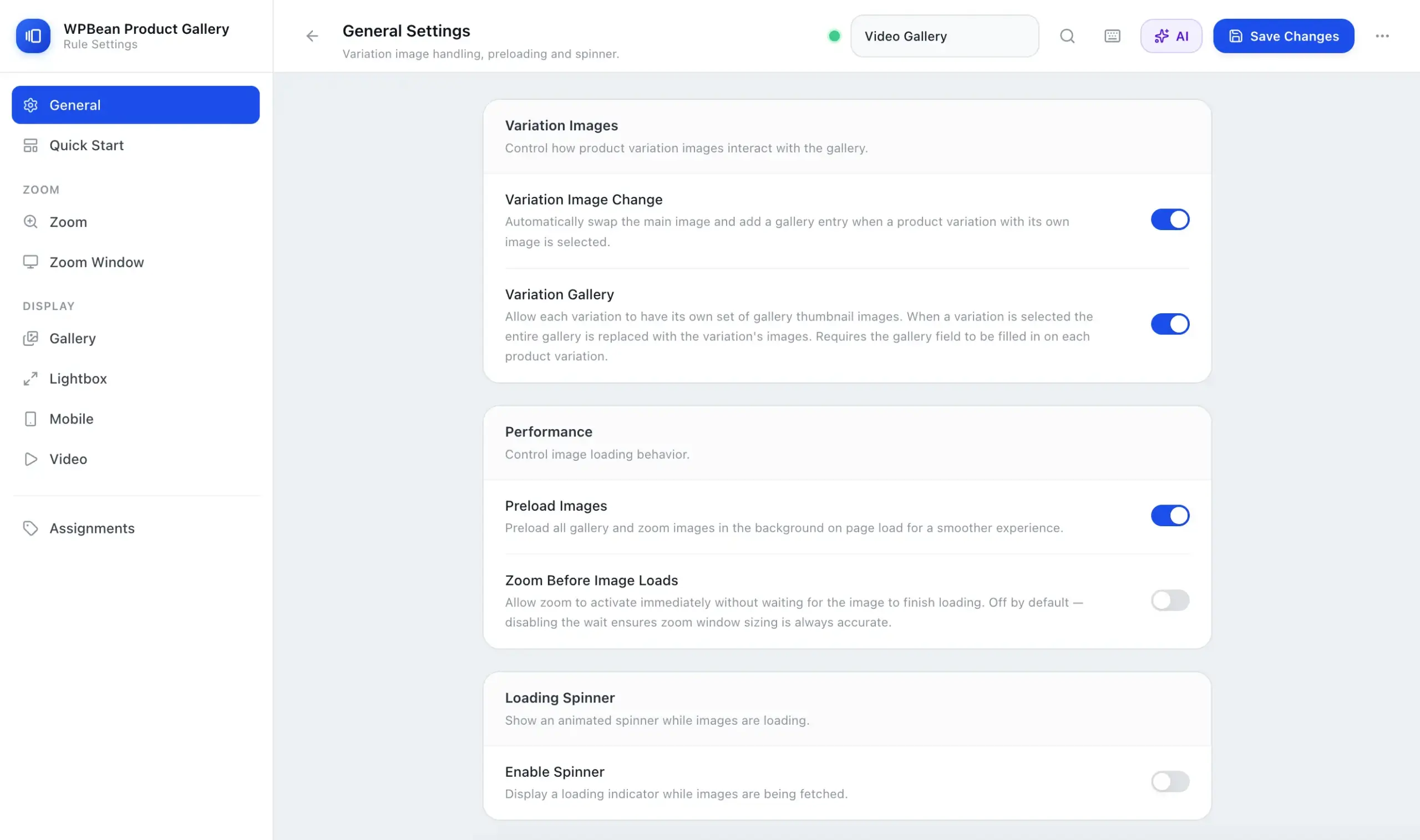
What is WPBean Product Gallery?
WPBean Product Gallery is an all-in-one AI-Powered WooCommerce product gallery plugin that enhances the default WooCommerce product image experience with advanced gallery features, product image zoom, sliders, lightboxes, product videos, and variation image galleries.
The plugin helps WooCommerce store owners create modern, interactive product galleries that allow customers to view products from multiple angles, explore detailed images, watch product videos, and switch between product variations for a better shopping experience.
WPBean Product Gallery combines multiple WooCommerce gallery solutions into one lightweight plugin, including product gallery sliders, image carousels, fullscreen lightbox galleries, image magnification, vertical galleries, mobile-friendly touch navigation, and customizable gallery layouts.
It is designed for online stores selling fashion, electronics, furniture, jewelry, beauty products, handmade items, and any WooCommerce products where high-quality product presentation helps customers make confident purchase decisions.
Key features include WooCommerce product image zoom, product video gallery support, additional variation images, variation-specific galleries, responsive mobile galleries, advanced gallery layouts, flexible gallery rules, and performance-focused frontend optimization.


Why Your Store Needs WPBean Product Gallery

Lightning-Fast Performance
Built with a performance-first architecture. No external libraries for slider, zoom, lightbox, or carousel—everything is custom-built and bundled into a single optimized JS and CSS file to reduce requests and improve load speed.

Zero Third-Party Dependencies
Unlike traditional gallery plugins, WPBean is fully self-contained. No external scripts mean fewer conflicts, better stability, and a cleaner WooCommerce environment.

Optimized Product Viewing Experience
Deliver smooth, intuitive product browsing with custom-built gallery interactions. Help customers explore images and videos effortlessly for faster purchase decisions.

Modern React-Based Admin UI
Manage galleries with a fast, modern interface built using React and Tailwind CSS. Clean UX, responsive layout, and developer-friendly architecture make configuration effortless.

Smart Admin Tools & Workflow
Boost productivity with instant search, keyboard shortcuts, and quick-start presets for different gallery types—reduce setup time and manage galleries faster.

Clean & Conversion-Focused Layouts
Showcase product images and videos in structured, distraction-free layouts designed to highlight products and improve customer focus.

Layout Stability (No CLS Issues)
Engineered to prevent layout shifts during loading, ensuring a stable visual experience and better Core Web Vitals performance.

Role-Based Gallery Control + Import/Export
Assign different gallery types to specific user roles or product groups. Easily import and export configurations for fast setup across stores or environments.

Built for Higher Conversions
A faster and cleaner gallery directly improves user engagement. By reducing friction and improving product clarity, your store creates a smoother path from browsing to checkout.

Stand Out with a Modern Storefront
Upgrade outdated WooCommerce galleries with a modern, high-performance system that helps your store look more professional and trustworthy compared to competitors.
Powerful Features Built for Modern WooCommerce Galleries
Explore the advanced features that make WPBean Product Gallery fast, flexible, and conversion-focused. From smooth image and video displays to performance optimizations and smart controls, everything is built to create a better shopping experience.
Create Stunning WooCommerce Product Galleries
Transform your default WooCommerce gallery into a modern, engaging product showcase with flexible layouts and advanced customization options.
- 14+ Professional Gallery Layouts
- Responsive Gallery Width Controls
- Thumbnails Quantity & Display Controls
- Custom Thumbnails Size Settings
- Slider Navigation & Pagination Controls
- Thumbnails Grid Layout & Customization
Additional Variation Images Gallery
Create unique product image and video galleries for each WooCommerce product variation.
- Unlimited Images per Product Variation
- Add Videos to Variation Galleries
- Drag & Drop Gallery Image Sorting
- Multiple Image Upload from Media Library
Product Videos in Gallery
Enhance your product galleries by adding videos and give customers a clear, engaging, and transparent product experience.
- Add Unlimited Videos to Gallery
- Support for Popular Video Platforms
- Autoplay and Loop Controls
- Custom Video Metabox Options
- Attach Videos to Any Product Image
- Separate settings for self-hosted and embedded videos.
Advanced Product Image Zoom
Add an advanced zoom feature to let your customers view products more closely and inspect every detail with ease.
- 3 Versatile Zoom Modes
- Precision Zoom Level Control
- Fluid Zoom Easing
- Fully Customizable Lens Overlay
- Tailored Zoom Window Options
- Mobile-Optimized Touch Zoom
Immersive Product Lightbox
Engage shoppers with gorgeous, full-screen product views that highlight every detail.
- 3 Cinematic Sliding Effects
- Custom Overlay Backgrounds
- Intuitive Thumbnail Navigation
- Smart Captions & Counters
- Integrated Social Sharing
- The Ultimate Viewer Toolkit
- Lightbox for Single Image or an Entire Product Collection
- Image Toolbar: Rotation, Flipping, and Pixel-Perfect 1:1 Zoom
Design Custom Layouts and Assign to Specific Products or Categories
Easily build tailored product gallery layouts and assign them to specific items or categories to deliver a highly engaging shopping experience.
- Craft and Assign Unique Layouts for Each Product
- Assign Layouts to Specific or Selected Categories
- Manage All Created Layouts from an Intuitive Dashboard
- Customize Each Product Layout to Match Your Store’s Design
- Mobile-Responsive Layouts – Engage Mobile Visitors & Drive Sales
AI-Powered Gallery Design Assistant for Smart Product Showcases
Create stunning product gallery designs effortlessly with AI-powered suggestions from text prompts or reference images and bring your gallery ideas to life instantly.
- Generate Gallery Ideas Using Text Prompts or Image References
- Get AI-Powered Layout Suggestions for Your Product Gallery
- Analyze Reference Images to Create Similar Gallery Styles
- Create Unique Gallery Designs Without Manual Configuration
- Use Your Own AI Provider API Key for Flexible AI Integration
Quick Start Gallery Presets for Instant Product Gallery Setup
Quickly create professional product galleries with ready-made presets designed for different layouts, styles, and shopping experiences.
- Choose From 12+ Ready-Made Gallery Layout Presets
- Instantly Apply Professional Gallery Designs with One Click
- Create Slider, Thumbnail, Grid, and Modern Gallery Styles
- Customize Presets Further with Detailed Gallery Settings
- Save Time by Starting with a Pre-Built Gallery Layout

Try WPBean Product Gallery Risk-Free for 14 Days
Explore all features and see how WPBean Product Gallery improves your WooCommerce product pages before making a commitment. No payment details required—just start your free trial and experience the difference.

Regular Updates
Stay up to date with continuous improvements, new features, and performance optimizations designed to keep your store running smoothly.

Reliable Support
Get help whenever you need it. Our support team is ready to assist with setup, questions, and any issues along the way.
Transform Your Product Pages with a Faster, Better Gallery Experience
Upgrade your WooCommerce store with a high-performance product gallery built to showcase your products beautifully, improve customer engagement, and create a smoother path from browsing to buying.
Loved by WooCommerce Store Owners
See how businesses are using WPBean Product Gallery to create faster, better-looking product pages and deliver a smoother shopping experience for their customers.
“I want to express my gratitude for this plugin and the outstanding support team. The plugin itself is fantastic, and the support has been super duper responsive and helpful. Thank you for providing such an excellent service!”
“Bought the plugin – uploaded it and run into imagesize trouble. Imram replied immediately on the chat, solved the problem and upgraded the plugin – sending me within minutes the upgrade. SIMPLY WOW!!”
“Great plugin. The free version looks professional, fully functional, and works out of the box.
Thank you, WpBean.”
“A great plugin that does exactly what it should do, we use it with emelmentor and it works perfectly. We had image names appearing that we didn’t want, and although they were due to our theme and another plugin someone from WP Bean’s support side looked into it and created coding to stop them appearing and went above and beyond to help us when most other plugins we use would normally say ‘its nothing to do with us’ or ‘it must be another plugin, work it out yourself’. Fantastic service and a great plugin.”
“I’m really confused why this plugin doesn’t have more downloads and 5 stars across all reviews. It’s perfect. Install, activate, done. Lightweight, simple. Beautiful zoom feature on the static images as well as the Lightbox, including a vertical gallery, auto play, image titles, and conspicuous exit icon. I have run into an issue with the styling of the images on the product page but it may be an incompatibility with one of my plugins or a simple CSS tweak to fix it. Thanks for this great solution to my e-commerce needs.”
“Every other zoom plugin I’ve tried has either been too technical, too laggy or didn’t offer both zoom AND a lightbox upon click.
This plugin is super lightwight, plug-and-play, and has the functionality we wanted. Just fantastic! Highly recommend.”
Frequently Asked Questions
Find answers to common questions about WPBean Product Gallery, its features, performance, compatibility, and how it can improve your WooCommerce product pages.
What does this plugin replace in my WooCommerce store?
This plugin is an all-in-one gallery engine that replaces standalone plugins for image zoom, gallery sliders, product videos, additional variation images, and full-screen lightboxes.
Do I need coding skills to configure the layouts?
No coding knowledge is required. You can manage layouts, zoom styles, video integrations, and global rules entirely through an intuitive admin settings interface.
Is this gallery plugin fully mobile responsive?
Yes. The plugin features a mobile-first design that supports touch gestures, swipe navigation, and pinch-to-zoom for an optimized mobile shopping experience.
How do the Gallery Presets and Rules systems work?
You can build specific layout presets and use the rules system to assign them globally, to selected products, or to specific product categories.
Can I change the position of the product gallery thumbnails?
Yes. You can position the thumbnail strip at the top, bottom, left, or right of the main image, or switch between slider and grid structures.
What are the premium advanced layout modes?
Upgrading unlocks high-end layouts like the Hierarchy Grid, Scroll-Linked Anchor Navigation, Sticky Split columns, and interactive Tile layouts with show more/less options.
What types of image zoom effects are included?
The free version includes high-detail Inner and Hover zoom options, while the premium version introduces advanced Lens Zoom and dedicated Window Zoom panels.
What interactive tools are available inside the full-screen Lightbox?
The lightbox includes navigation arrows, image counters, captions, and autoplay slideshows. The premium version adds image rotation, mirror flipping, 1:1 scaling, social sharing, and downloads.
Which video streaming platforms are supported for product galleries?
You can embed videos directly into the gallery timeline using YouTube, Vimeo, self-hosted files, or videos from your WordPress Media Library.
How does the plugin handle variable products?
When a customer selects a variation, the main gallery instantly replaces or updates the images to match that specific choice. The Pro version supports full multi-image galleries per variation.
Does this plugin work with any WordPress theme?
Yes. It integrates seamlessly with popular modern themes, page builders, and core WooCommerce hooks while utilizing a standalone architecture to prevent theme styling conflicts.
Will adding multiple gallery features slow down my product pages?
No. The plugin was completely rewritten from the ground up to minimize frontend assets, reduce HTTP requests, eliminate dependency on heavy third-party libraries, and preload images for fast switching.
How does the AI-powered Product Gallery Assistant work?
The AI Gallery Assistant helps you create product gallery designs using simple text instructions or reference images. Describe the gallery style you want, upload an example design, and AI will suggest suitable gallery layouts and settings.
Can I use my own AI API key with this feature?
Yes. You can connect your own AI provider API key and use AI features directly inside the plugin. This gives you full control over your AI usage and API settings.
Can AI create a gallery layout from an example image?
Yes. Upload a reference image of a gallery design you like, and the AI can analyze the style, layout, and structure to suggest a similar product gallery setup.
What can I ask AI to create for my product gallery?
You can request different gallery styles, thumbnail positions, slider layouts, zoom experiences, product showcase ideas, and more based on your store’s design requirements.
Can I customize the AI-generated gallery settings?
Yes. AI provides a starting point, and you can fine-tune every gallery option afterward to match your brand style and shopping experience.
What are Gallery Quick Start presets?
Gallery Quick Start provides 12+ ready-made gallery presets that allow you to instantly create different product gallery layouts with a single click. You can customize any preset from the gallery settings afterward.
Can I use AI and presets together?
Yes. You can start with a ready-made preset and use AI suggestions to customize or create a gallery style that matches your product presentation needs.

Dedicated Support When You Need It
We take great care of you and your website today, and every day after that.
Ready to Build Faster, Better Product Pages?
Join store owners who are using WPBean Product Gallery to create beautiful, high-performance product experiences. Upgrade your WooCommerce store with a faster, smarter gallery built to engage customers and drive more sales.